Home / Use cases / What your program really costs
Use case · program cost
What your program really costs, without a spreadsheet
Updated October 2026
Spend and volunteer hours by program on one sheet next to what was delivered, plus staff time by program from the payroll export. Divide. Here is how a meals program finds its real cost per meal.
The problem, in your words
A funder asks what a meal costs you. You say about four dollars, because that is the food. It is not four dollars. It is the food, the van, the coordinator's Saturdays, the director's Tuesday afternoons, the insurance, and the four hundred volunteer hours nobody counted. You have never seen that number, so you have never been able to ask for it.
You are not underpricing on purpose. Your costs live in three places that do not know about each other. The fix is to point all three at the program.
Record spend against a program. Log staff time by program and approve it. Let volunteer hours land from check-ins. Then open the program in Impact Reports: what was spent and what the donated time was worth, beside what was delivered. Divide by the meals. Add the staff cost from the payroll export, which the sheet does not carry yet. That is the number to put in the grant budget.
The org in this example
Established band ($100K to $500K a year)
An invented example, sized like the orgs Ember is built for. Not a customer.
The walkthrough
Give every program a plan and a spend
In Ember Budget, Weekend Meals has a plan for the year, $140,000, and $31,495 spent against it so far. Every cost you enter gets a program and a category: supplies, mileage, insurance, events. The bar shows what you have spent against the plan, with a marker for how far into the year you are. Set up your admin and fundraising work as programs too, and their costs have somewhere to sit instead of disappearing into a general pile.
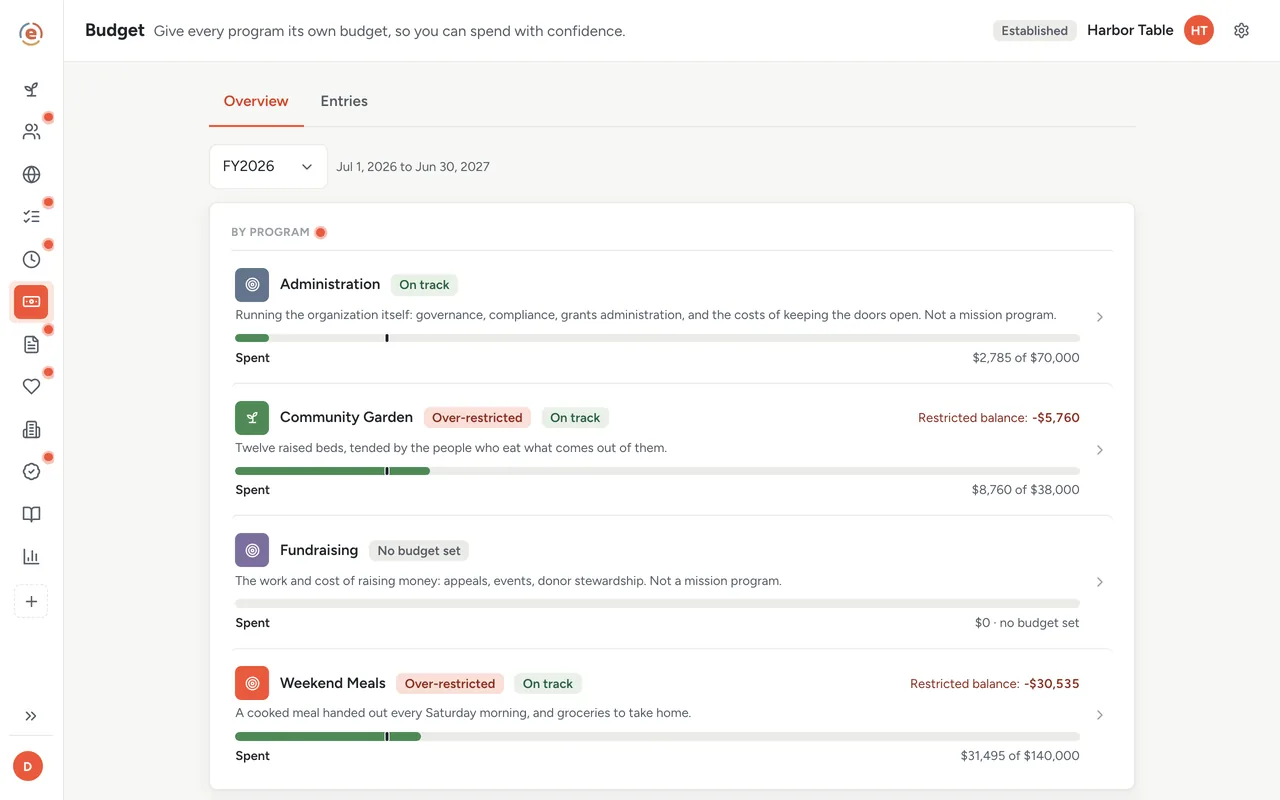
Every program with a plan, a spent bar, and how far through the year you are. Demo data. Where your staff hours actually went
Everyone on payroll logs their week in Ember Time, split by program, with admin as one of the choices. Somebody approves the week. For hourly staff, approved hours multiplied by each person's pay rate give you what that program cost in staff. It shows up week by week on the By program table of the payroll export. Salaried staff show their hours there with no dollar figure, so you price those hours from the salary yourself. The Saturdays your coordinator works are now a cost of Weekend Meals rather than a general expense nobody can point at.
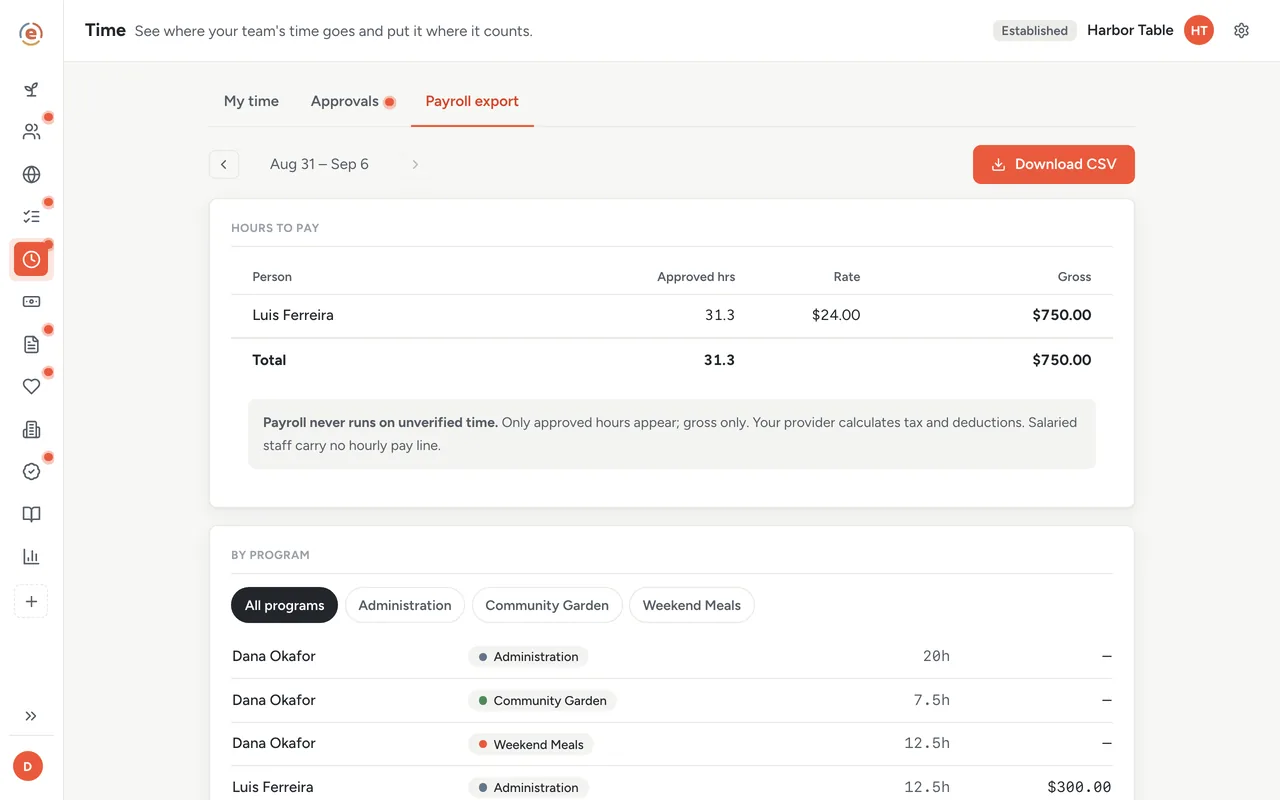
Staff cost, by program, from approved hours only. Demo data. Volunteer time, counted and kept apart
Two hundred and twenty volunteer hours from 34 people land on Weekend Meals when those people are checked in at shifts. You set what an hour of volunteering is worth to you; this example uses $36.14, the national figure, so the page values those hours at $7,951. It sits on its own line, apart from the money, because donated time is not cash and a funder will want to see the two separately.
Read what the program took, in one place
Open Weekend Meals in Ember Impact Reports. What we did: 2,970 meals and 101 households so far this year. What it took: $31,495 spent, $700 raised, 220 volunteer hours from 34 people, and underneath, the $7,951 those hours were worth. One thing is missing here: staff cost per program is not on this page yet, so you add it from the payroll export. The Performance tab does give you a total program cost for the whole org, counting staff pay, direct costs and the value of donated volunteer time together, so take the volunteer value out before you use it as a cash figure. It also tells you how much of that figure came from hours somebody approved.
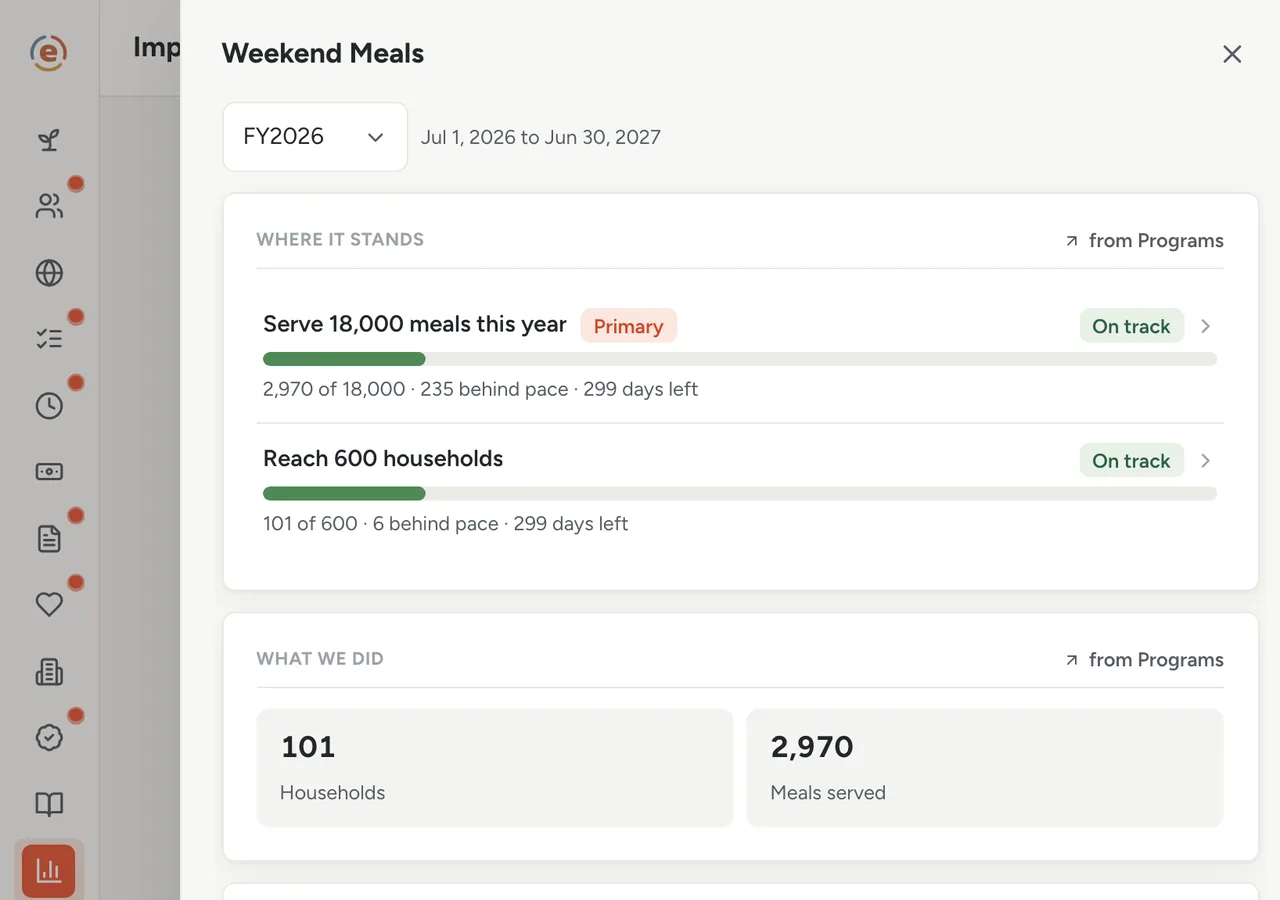
Meals delivered, next to what they took: money spent and donated time. Demo data. Divide, and put the real number in the grant
$31,495 divided by 2,970 meals is $10.60 a meal, counting money alone. Add what the donated hours were worth and it is $13.28. Add the staff hours from the payroll export and it goes higher still. The funder was told four dollars. The guide on what a program really costs explains why small orgs underprice this and how to stop.
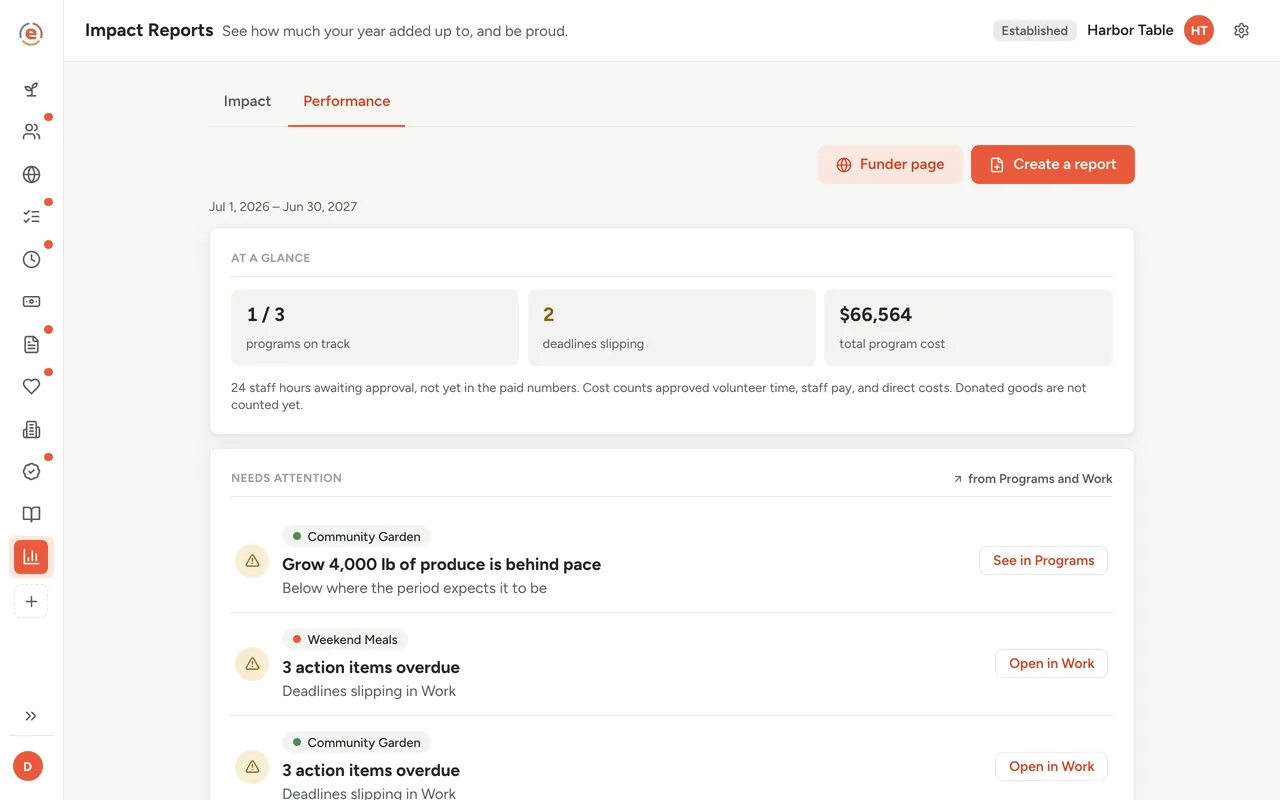
Total program cost across the org, and how much of it is approved data. Demo data. The board sees the totals, not the payroll
Cost figures are visible only to owners and admins, so a treasurer who needs them is given an admin role. Board members see each program's summary, what it raised and spent against plan, and never an individual transaction, a donor's name or anybody's pay. The board gets the number it needs without anyone on staff losing their privacy.
Try the number
Weekend Meals, as recorded. The first three come off the program sheet; staff cost is the one you add. Change any figure and the cost per meal moves.
Money spent, volunteer hours and units come off the program sheet in Impact Reports. Staff cost is the one you add, from the payroll export. The volunteer rate is the Independent Sector figure for 2025. Nothing you type leaves this page.
Who does what
If you are the executive director
You can answer the funder with a number that includes your own time. Next year's grant budget asks for what the program costs, not what the food costs.
If you are the treasurer with an admin role
Spending and donated time are on the program page; staff cost per program is on the payroll export. Both trace back to the entries and the timesheets they came from. There is no allocation spreadsheet to maintain.
If you are the program manager
Your Saturdays show up as a cost of the program you run, which is the first step to getting them funded.
- A program a funder asks about by the unit: a meal, a client, a session, a bed night.
- Staff whose time is split across programs and never priced.
- Volunteer hours that should be counted, and shown apart from cash.
- A grant budget that has been guessing at the real cost.
What it costs at this size
An org with a $320K budget sits in the Established band: $99 a month billed yearly, every app, unlimited users. Under $50K a year it is $0. See every band.
Free templateNonprofit startup budget
Starting from zero? The startup budget guide walks through the first year's costs before there is a program to price.
This is general information, not accounting advice. How costs are allocated for a funder or an audit follows the funder's rules and your accountant's method. Use these figures to understand your programs, and confirm the method before you report them.
The Ember tool for this stepEmber Budget
Ember Budget tracks money in and out by program and keeps restricted funds apart from flexible funds. Unlimited users on every tier.
The Ember tool for this stepEmber Time
Ember Time lets your team log time by program, and you approve the week. Approved hours for hourly staff become each program's staff cost at the rate you set. Unlimited users on every tier.
The Ember tool for this stepEmber Impact Reports
Ember Impact Reports gathers each program's counts, volunteer hours and spending from the Ember apps you already use, so nothing is typed twice. Unlimited users on every tier.
Sources: Value of a volunteer hour: Independent Sector, Value of Volunteer Time (2025 data, released April 2026), $36.14, read 3 September 2026. The org, people and figures on this page are an invented example; Ember has no customer data to report yet. Product behavior is described as built on 3 September 2026 and re-checked at each release.