Home / Use cases / Volunteer shifts without chasing hours
Use case · volunteers
Running volunteer shifts without chasing anyone for hours
Updated October 2026
Post a shift once, take sign-ups from your own page, check people in at the door, and the hours log themselves. Here is how a one-coordinator nonprofit does it.
Watch it work
A week of volunteers, start to finish.
One shift posted, and everything that follows.
Read the transcript
Saturday’s meal service is full. The garden still needs help, so Priya posts one shift.
Ember tells the garden’s volunteers. Kayla, a regular, sees the email and signs up.
Priya checks Kayla in at the shift, and Kayla’s hours are credited and approved in the same step. The hours land in the pantry’s impact reports for the month, the quarter and the year.
Ember thanks Kayla for every hour she gives. It tells Priya when a volunteer starts to drift away, and reminds everyone before next week’s shift.
The problem, in your words
Sign-ups live in a group text and a form nobody checks. Saturday morning, eleven people show up for eight spots, or four do. Hours are on a clipboard by the door. At month end you chase twenty people for numbers the grant report needs by Friday. You spend more time counting volunteers than thanking them.
You are not disorganized. You are running a scheduling system out of your pocket. The fix is not a bigger clipboard. It is a shift that manages its own sign-ups and logs its own hours.
Post the shift once. Volunteers sign up from your own public page, no account needed. On the day, you check people in at the door and the hours log themselves. A full shift can keep a waitlist. The hours are already in the report, by program, with the value of that time beside them.
The org in this example
Established band ($100K to $500K a year)
An invented example, sized like the orgs Ember is built for. Not a customer.
What it looks like, week by week
Post Saturday once, and it keeps coming back
In Ember Volunteers you post one shift: what you need, which program it is for, the time, and eight spots. Set it to repeat every week until December and you are done posting for the year. If your volunteers have said when they are free, Ember suggests the times most of them can make. You get a link to the sign-up page to paste anywhere.
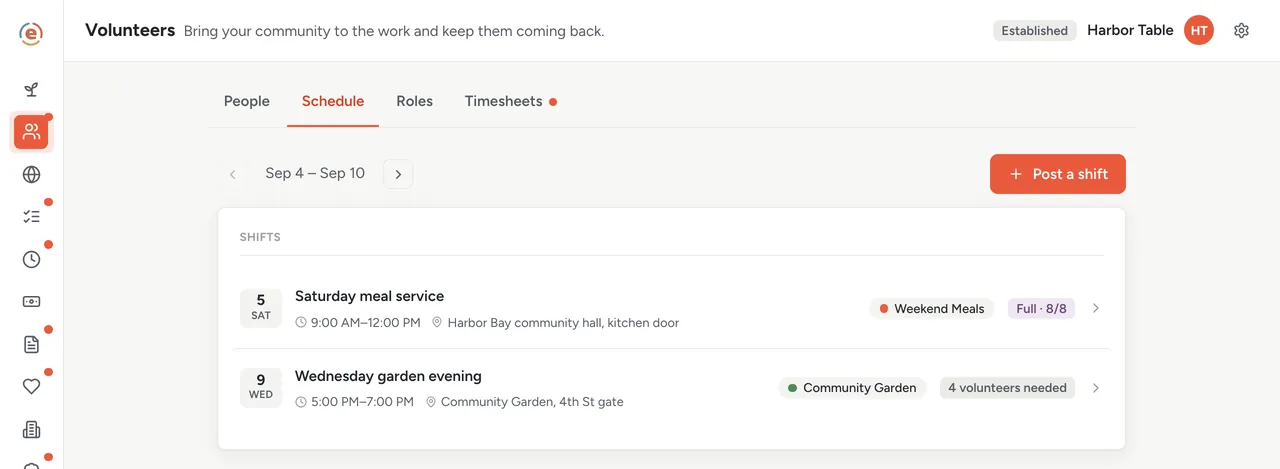
The week ahead. Saturday is full with two people waiting; Wednesday still needs three. Demo data. Volunteers sign themselves up, from your own page
The shift shows up on the free public page that comes with Ember Web, under the program it serves. Someone taps Sign up, gives a name and an email, and that is it. No account, no app to install. If you turn on the waitlist for the program, the button becomes Join the waitlist when the eight spots are gone. One thing to know. Until you link your EIN to the public IRS record you can take 25 sign-ups in total; linking it takes that to 100, and confirming your website or email address removes the cap.
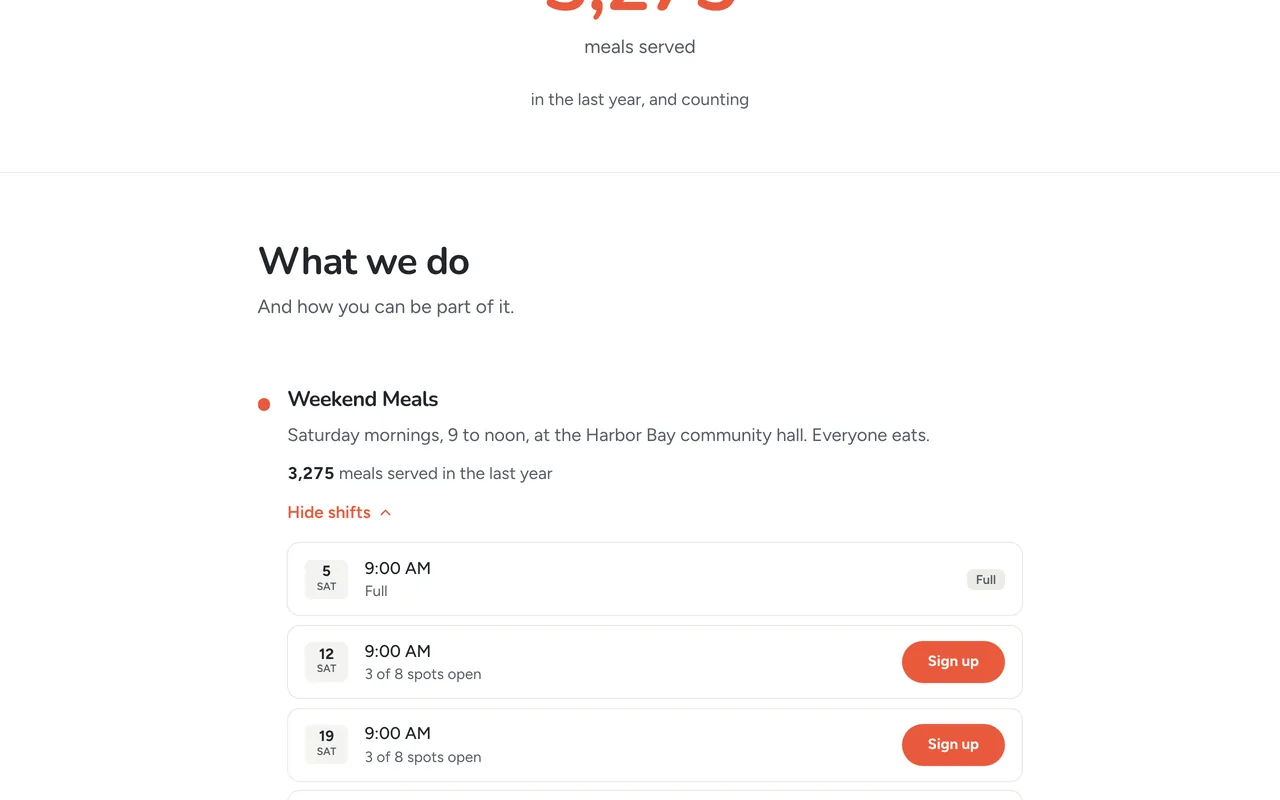
What a volunteer sees: the next three Saturdays, one already full. Demo data. Someone drops out and the next person moves up
Ember emails the people on a shift a reminder with the day and time. You choose when, program by program: two weeks, one week, three days or one day before. Each program sends a reminder three days before the shift unless you change it. A volunteer who can't come taps Can't make it from their own page. You see the empty spot and move up the first person waiting, who gets an email about it. Nobody sends a group text.
Saturday: tick people off at the door
Open the shift on your phone and tap each name as they arrive. Every tap records three hours, the length of the shift, already approved. Somebody turns up who never signed up? Type their name and they are signed up and ticked off at once. Marking a no-show is one tap too.
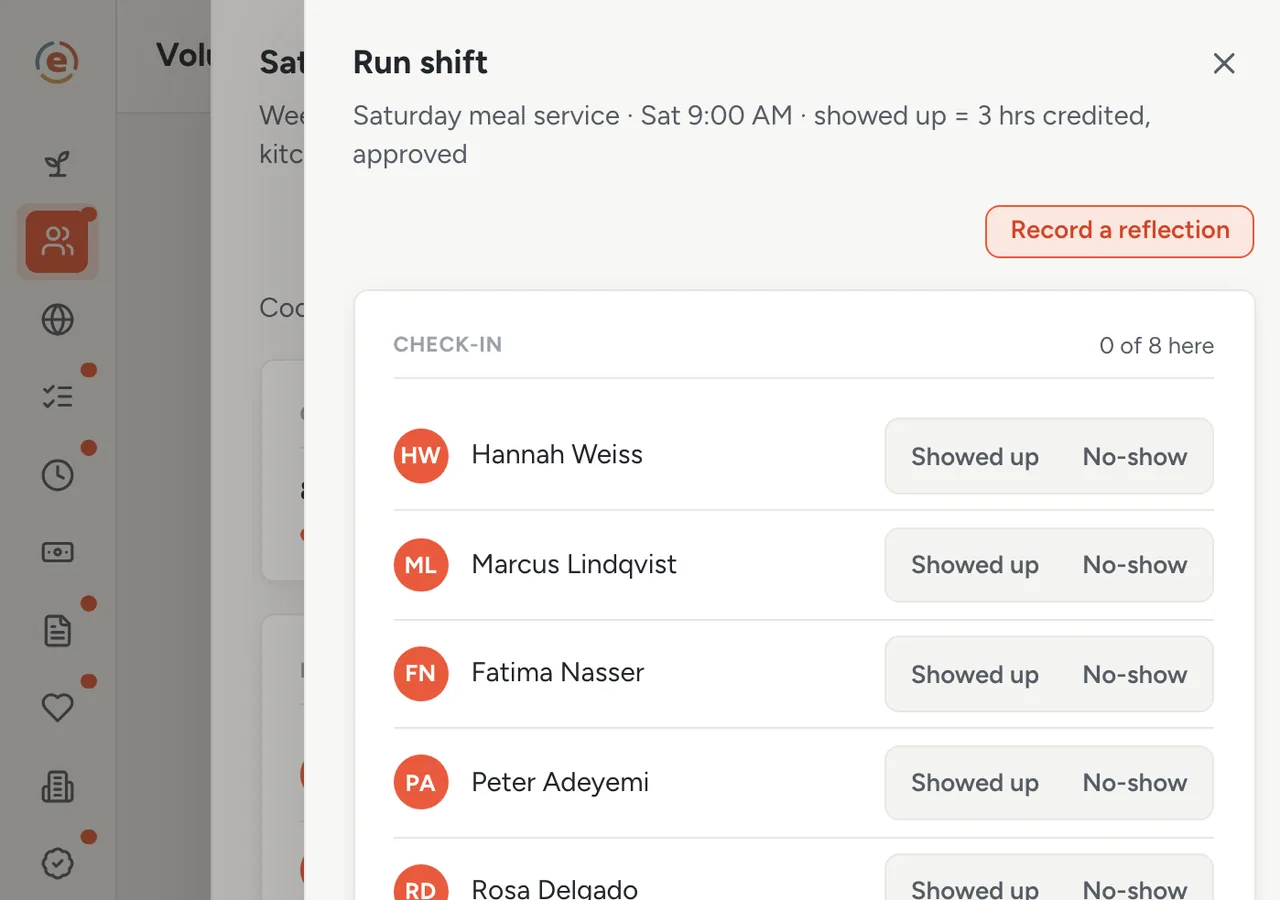
One tap per person as they arrive. Three hours each, recorded. Demo data. One line about how it went, before you leave
Write down what worked and what to fix, while you still remember. It lands in Ember Programs next to the meal counts. That is where you will look when a grant report asks you to describe the work.
The hours nobody was there to see
A volunteer who served a shift they were not checked in for logs those hours from their own page. They wait for you rather than counting straight away. You approve them, or send them back with a note saying what to fix. Hours you record yourself are approved as you enter them. Every line says which of the three it was, so you can always tell what came from where.
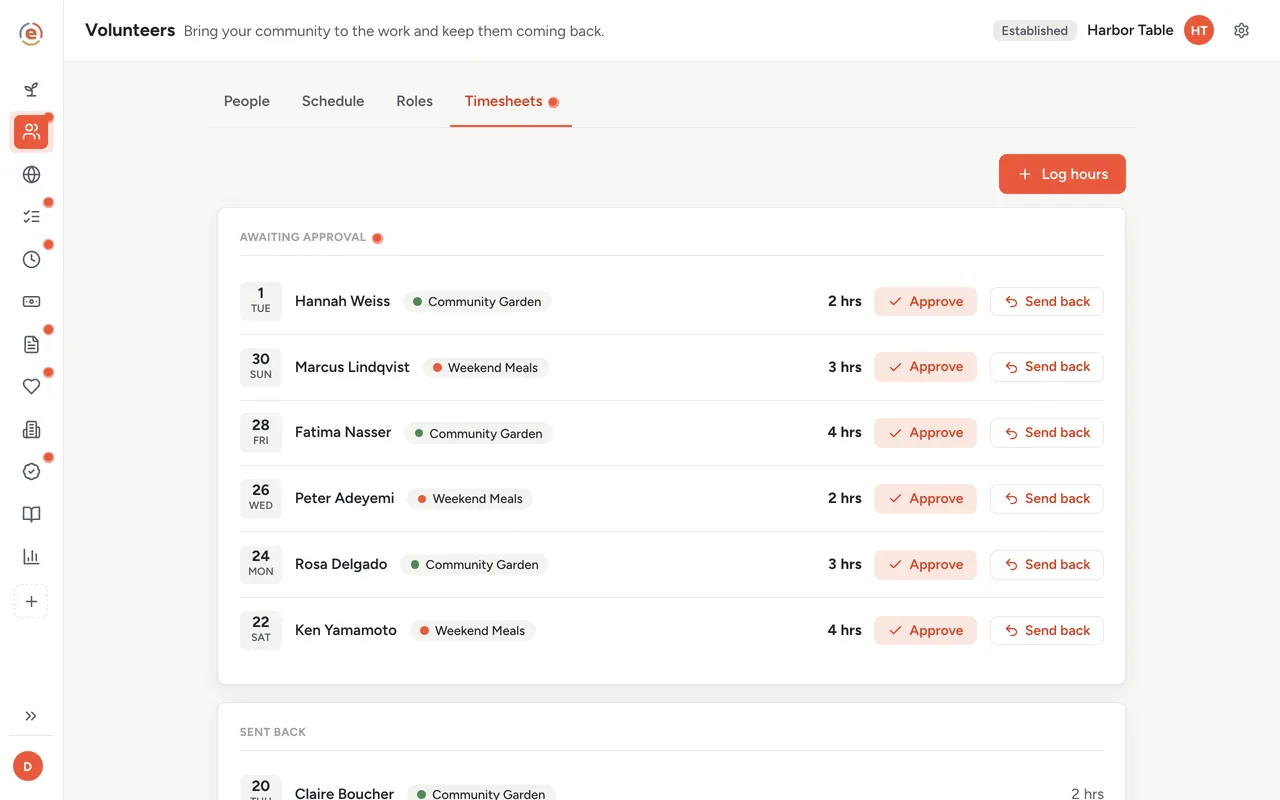
Six entries waiting on you, each with an Approve and a Send back. Demo data. Your list of volunteers tells you who is drifting away
Each person's row shows their hours, their shifts and what they are good at. Anyone who has gone quiet for 60 days is tagged, and that tag is your Monday call list. You can also set out what a new volunteer has to do first: an orientation, a food-handler video, a background check you ran somewhere else. The list shows who still has one outstanding. A missing waiver shows as a warning and never stops anyone working.
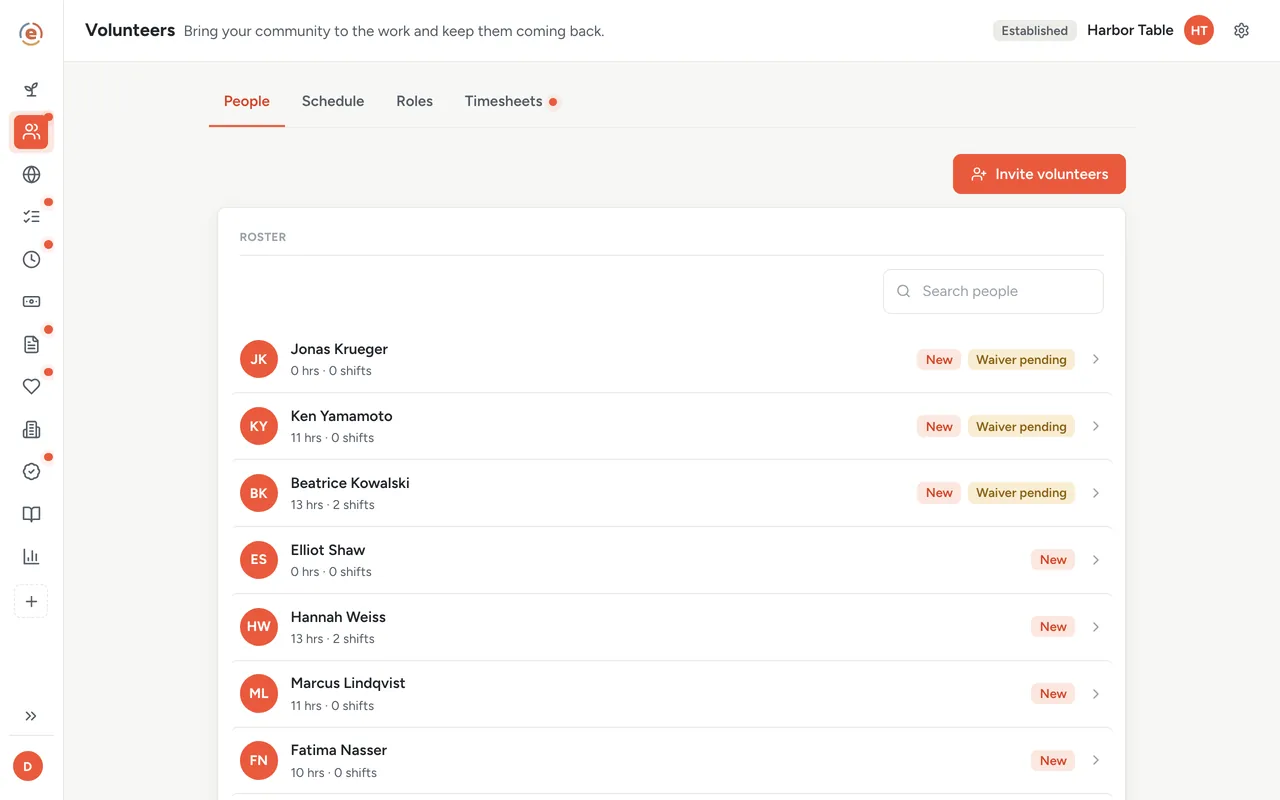
Four people have gone quiet. That is Monday's call list. Demo data. The report is already written
Open the program in Ember Impact Reports. The volunteer hours and the number of people are there, next to what you spent. Underneath, what that donated time was worth at the rate you chose. It stays separate from money spent, because time given is not money. Download it and paste it into the grant report. You chased nobody.
Who does what
If you are the coordinator
You post shifts, tick people off at the door, and call the people who have gone quiet. The odd hour someone adds themselves comes to you to approve. The clipboard, the group text and the month-end chase are gone.
If you are the executive director
You can see whether this week is covered without asking anyone. The volunteer hours sit in the report by program, for the year so far, with what that time was worth beside them. If you need one quarter on its own, create a report in Impact Reports and pick This quarter or Last quarter.
If you are a volunteer
You sign up from the page with a name and an email. If you have an Ember sign-in, your own page shows the shifts you are down for, a button to say you cannot make it, and your hours, with a note if one needs fixing. Otherwise, reply to your confirmation email to say you cannot make it.
- Recurring shifts with a real capacity, and people who sometimes cannot make it.
- A grant or board report that needs volunteer hours by program, not a total.
- Volunteers who should be able to sign up without creating an account.
- One coordinator, or the director, doing this from a phone between other jobs.
What it costs at this size
An org with a $320K budget sits in the Established band: $99 a month billed yearly, every app, unlimited users. Forty volunteers or four hundred, the price is the same, because it follows your budget and not your headcount. An all-volunteer group under $50K a year pays $0. See every band.
Free templateVolunteer sign-up sheet template
Running a one-off event on paper? Take the free sheet. When it becomes a weekly shift, post it once instead.
This is general information, not legal advice. Rules on volunteers, minors, waivers and background checks vary by state and by program. Check with your insurer or an attorney before you rely on any of it.
The Ember tool for this stepEmber Volunteers
Ember Volunteers lets people sign up for your shifts from one link, with no account. You check them in on your phone, and their hours are recorded. Unlimited users on every tier.
The Ember tool for this stepEmber Web
Ember Web gives you a free public page with your mission, the numbers you choose to publish and your open shifts. It stays current as you work in Ember. Unlimited users on every tier.
The Ember tool for this stepEmber Impact Reports
Ember Impact Reports gathers each program's counts, volunteer hours and spending from the Ember apps you already use, so nothing is typed twice. Unlimited users on every tier.
Sources: Value of a volunteer hour: Independent Sector, Value of Volunteer Time (2025 data, released April 2026), $36.14 national average, read 3 September 2026. The org, people and figures on this page are an invented example; Ember has no customer data to report yet. Product behavior is described as built on 3 September 2026 and re-checked at each release. Shift reminders were re-checked on 25 September 2026.