Home / Use cases / Staff time across federal grants
Use case · grants and staff time
Staff time across federal grants, without the month-end spreadsheet
Updated October 2026
Log hours by program each week, have one person approve them, and the split across grants builds itself. Here is how that works when you have three staff and two federal grants.
The problem, in your words
Two grants each pay part of the same coordinator. The county wants to know what share of her time was theirs. So does the state. Your answer today is a spreadsheet that gets filled in at month end, from memory. You know it would not survive a hard look.
You are not doing it wrong. The tools are wrong. A spreadsheet has no memory of who approved what, or when. A payroll app knows the total, not the split. The split is the whole question.
Everyone you pay logs their hours by program each week, admin and fundraising included. One person approves the week. Approved hours, times each person's pay rate, become the staff cost of each program. Each grant then shows the other costs recorded against the program it funds. That is the whole system, and it is the record an auditor asks for.
The org in this example
Established band ($100K to $500K a year)
An invented example, sized like the orgs Ember is built for. Not a customer.
What the rule asks for
The federal rule on salaries, 2 CFR 200.430, asks that the record cover a person's whole job, not only the hours you charge to the grant. It has to sit in your official records, be backed by internal controls (a second person approving the time is the usual one), support how you split the cost, and match what you actually paid. For nonexempt staff (those owed overtime) it must also show the hours worked each day. No special form, and no signed certificate every month, as long as your records do that job. Time and effort reporting is the name for the habit.
What it looks like, week by week
Set it up once
Add each grant once: who it is from, how much, and the one program it pays for. Then say what each person is paid an hour. Pay rates are dated, so giving someone a raise in March does not quietly rewrite January.
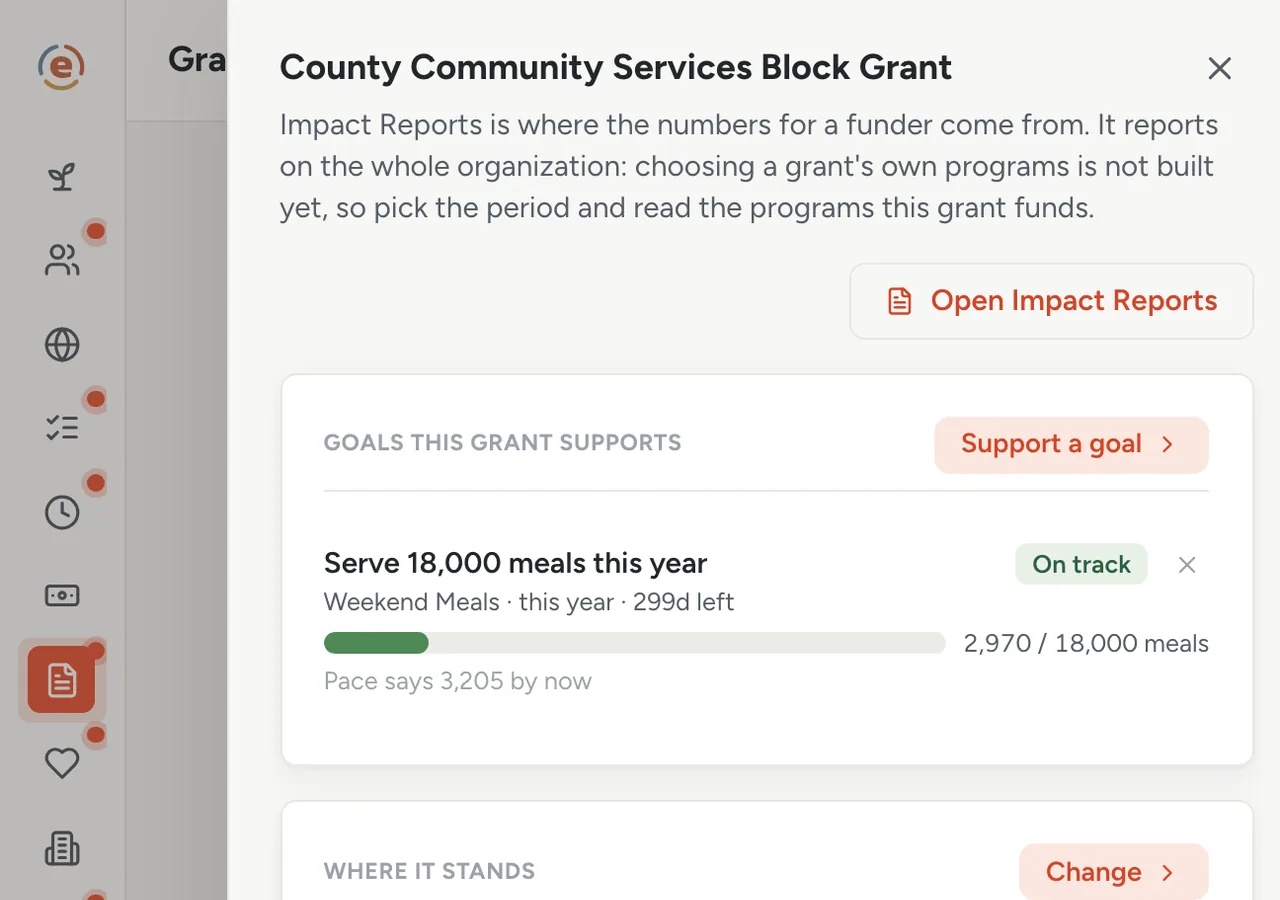
The county grant: the goal it pays for, the award, what is left, and the report dates. Demo data. Monday: your coordinator logs last week
Whoever ran the program opens Ember Time, taps the programs they worked on, and taps the hours. Meals on Saturday, the garden on Wednesday, a little admin. Most weeks it is one tap of Same as last week, one line fixed, and it comes to you. It takes about as long as reading this step.
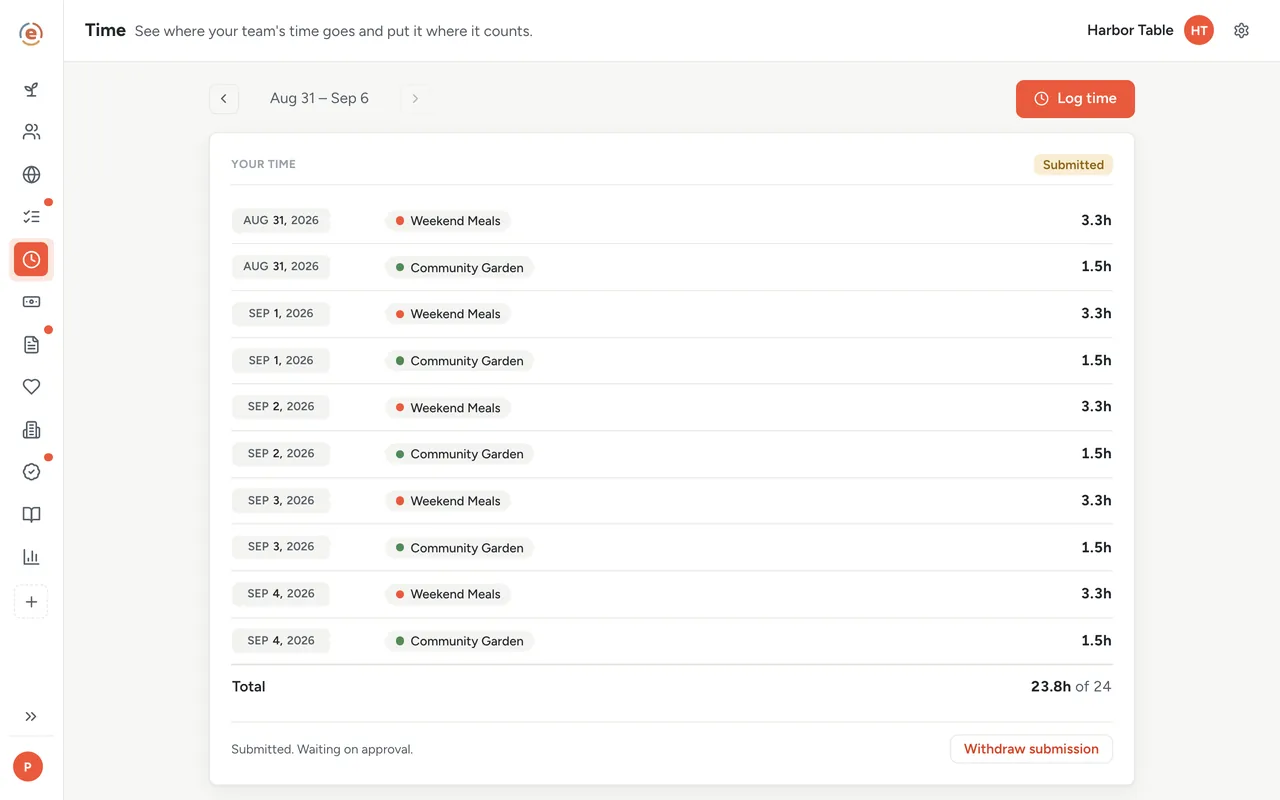
One week, three programs, one button to send it for approval. Demo data. You get an email when a week is waiting
Nobody has to remember to chase anyone. If someone has not turned in their time, they get a reminder the day before it is due and another the day after. On the due day you get an email saying how many timesheets are waiting on you.
You approve the week, or send it back
Each week shows you whether that person is paid by the hour or on a salary, a flag if they went over 40 hours, and how long it has been sitting there. Approve it, or send it back with a note saying what to fix. If you ever approve your own hours, the record shows that too.
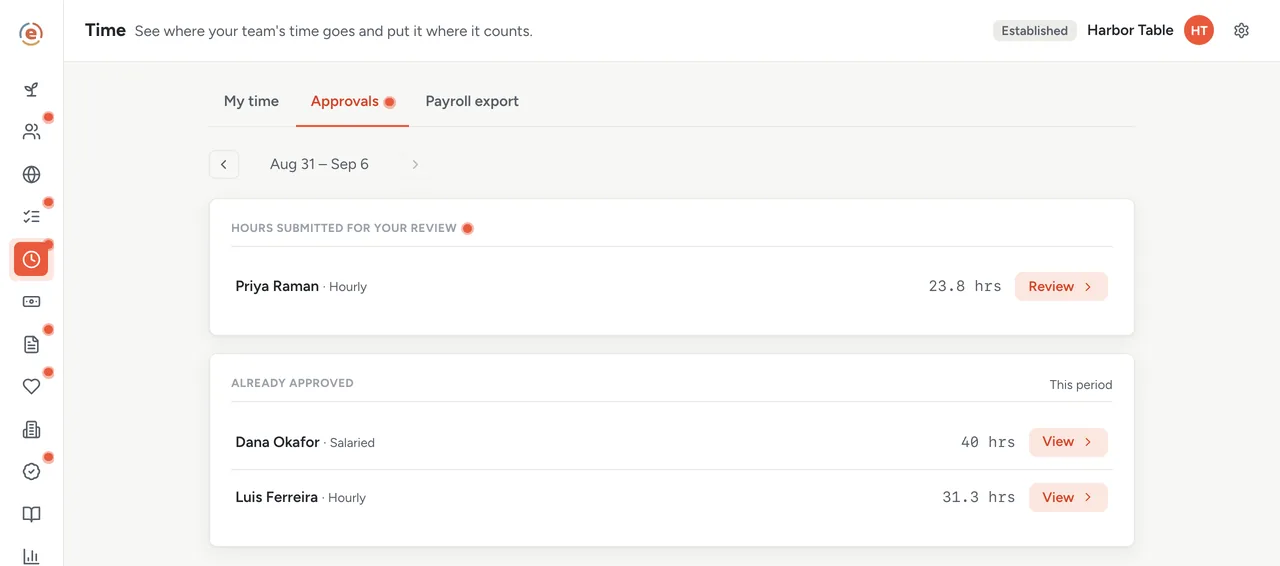
Nothing counts until someone signs off. A coordinator can never approve their own week, and if an owner or admin approves their own, Ember flags it. Demo data. The split you have been doing by hand appears on its own
Approved hours, times each person's pay rate, is what the week cost. The same screen breaks that cost down by program. Download it as a spreadsheet and you have the split across every grant, person by person, week by week. That is the number the county asked for.
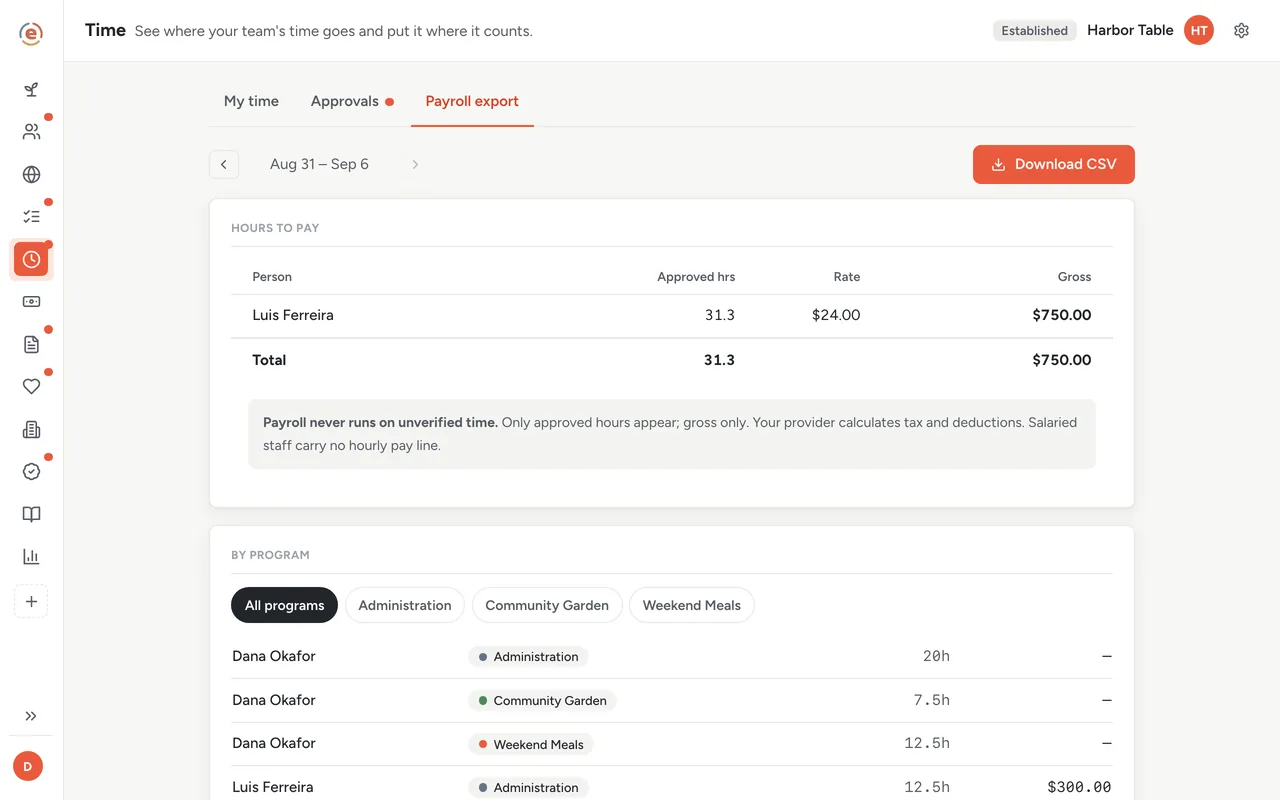
The split, by program, built only from hours somebody approved. Demo data. Each grant shows what it has spent
Record what you spend against the program it belongs to, in Ember Budget. Because the county grant pays for one program, you can see how much of it is left after the costs you recorded; add the program's staff cost from Time for the full picture. The dates its reports are due sit right beside it.
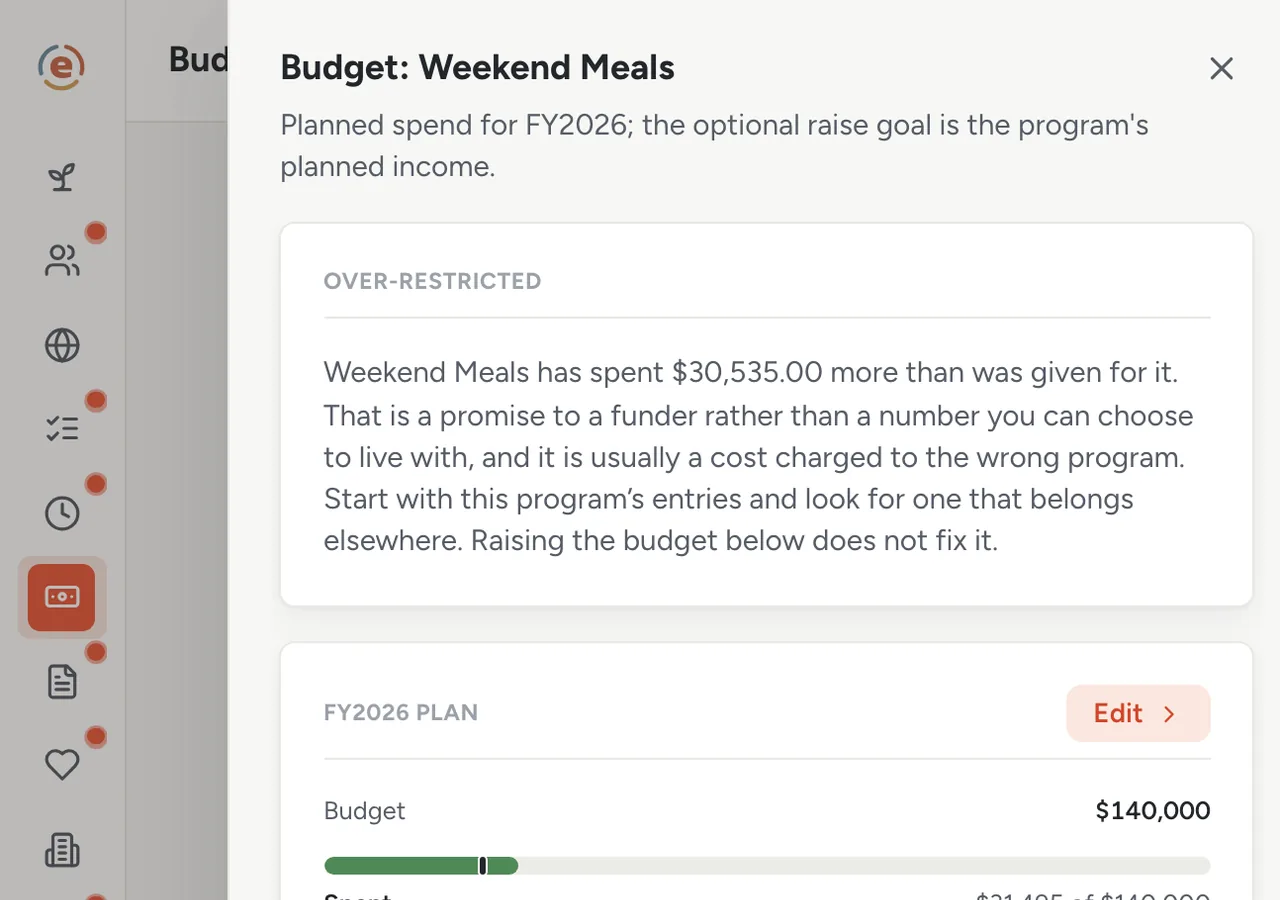
One program: what you planned to spend, what you have spent, and how far into the year you are. Demo data. Audit day
Send two files: approved hours by person and program, and the money you spent. Then open Team's History for what each person was paid at the time. Who approved each week, and when, is recorded and comes with your organization's full export. Nothing has to be rebuilt from memory, because none of it was ever kept in anyone's memory.
Two things Ember does not do
It does not pay anyone. It hands your payroll provider the approved hours and what they add up to; they still run payroll. And while everyone's hours are split by program, the dollar figure follows the people you pay by the hour, not the people on a salary.
Who does what
If you are the executive director
You approve the week. You and anyone you make an admin are the only people who can see pay rates. When the auditor writes, you send a few files and open one screen. You never open a spreadsheet.
If you are the program manager
You log your time by program once a week, and you can approve time for the programs you run. You cannot approve your own, which protects you as much as it protects the org.
If you are the treasurer or on the board
You see each program's money: what came in, what went out, whether it is on pace. You never see a pay rate, a donor's name or a single line of the ledger.
- Two or more grants pay part of the same person's wages, and a funder wants to know the split.
- You have a few paid staff and one person who can check their hours.
- Your money comes from federal or state grants, so an audit is a real possibility.
- You would rather the record built itself every week than be reconstructed every month.
What it costs at this size
An org with a $320K budget sits in the Established band: $99 a month billed yearly, with every app and no limit on how many people you add. Under $50K a year it is $0. Your price follows your budget, so hiring a fourth person does not change it. See every band.
Free templateTime and effort certification template
If your funder wants a signed certificate on top of the approvals, this is the one to use. Free, no sign-up.
This is general information, not legal or accounting advice. Federal grant rules change and are applied differently by different agencies and auditors. Check with your auditor, your grant officer, or an attorney before relying on any of it.
The Ember tool for this stepEmber Time
Ember Time lets your team log time by program, and you approve the week. Approved hours for hourly staff become each program's staff cost at the rate you set. Unlimited users on every tier.
The Ember tool for this stepEmber Grants
Ember Grants keeps every award, deadline and report in one place. You can see what you owe each funder, and when. Unlimited users on every tier.
The Ember tool for this stepEmber Budget
Ember Budget tracks money in and out by program and keeps restricted funds apart from flexible funds. Unlimited users on every tier.
Sources: Regulation: 2 CFR 200.430 (eCFR), read 3 September 2026. The org, people and figures on this page are an invented example; Ember has no customer data to report yet. Product behavior is described as built on 3 September 2026 and re-checked at each release.