Home / Use cases / Grant reports from work you already track
Use case · reporting
Grant reports from the work you already track
Updated October 2026
Log the week's numbers where the report will read them, and the report becomes a snapshot plus the two paragraphs only you can write. Here is how a three-grant nonprofit does it.
Watch it work
Every promise, and the day it comes due.
Luis looks after the grants that pay for the food at a small pantry.
Read the transcript
Three grants pay for the food this pantry gives away, and every one of them came with a promise to keep. Not one of those promises lives in Luis’s head any more.
The state grant that paid for the garden wants proof of what its money grew, in a week. The proof is already waiting for him: the pounds the garden grew, counted by the team all season.
They are a little behind, and Luis finds out now, while there is still a season left to catch up. He did not have to remember the date either. Ember reminded him, a week out.
He writes the report, files it, and that promise is kept. The next grant he is going after has a deadline of its own, and Ember is already holding it.
The problem, in your words
The final report for the state grant is due in twelve days. It wants numbers served, hours given, dollars spent, and a story. The numbers are in a spreadsheet, the hours are in another, the spend is in the bookkeeping, and the story is in someone's memory. You will spend a weekend rebuilding a quarter you already lived.
You are not behind. Your records are just in four places, and the report wants them in one. The fix is to log the work where the report will read it.
Each program has goals. Counts get logged as the work happens, a few numbers a week. Volunteer hours and spend land on the same program from their own apps. When the report is due, open the program and read the five bands. Then tap Create a report on the Reports page for a snapshot you save as a PDF. The narrative is still yours to write. The numbers are not.
The org in this example
Established band ($100K to $500K a year)
An invented example, sized like the orgs Ember is built for. Not a customer.
The walkthrough
Set the goals the grant is paying for
Say your Community Garden has to grow 4,000 pounds of produce this year. You write that down once in Ember Programs as the program's goal. Then, in Ember Grants, you tie the state grant to it. From then on, the grant's page shows how far along that goal is and whether you are on pace. In Impact Reports, the goal lists every grant counting on it.
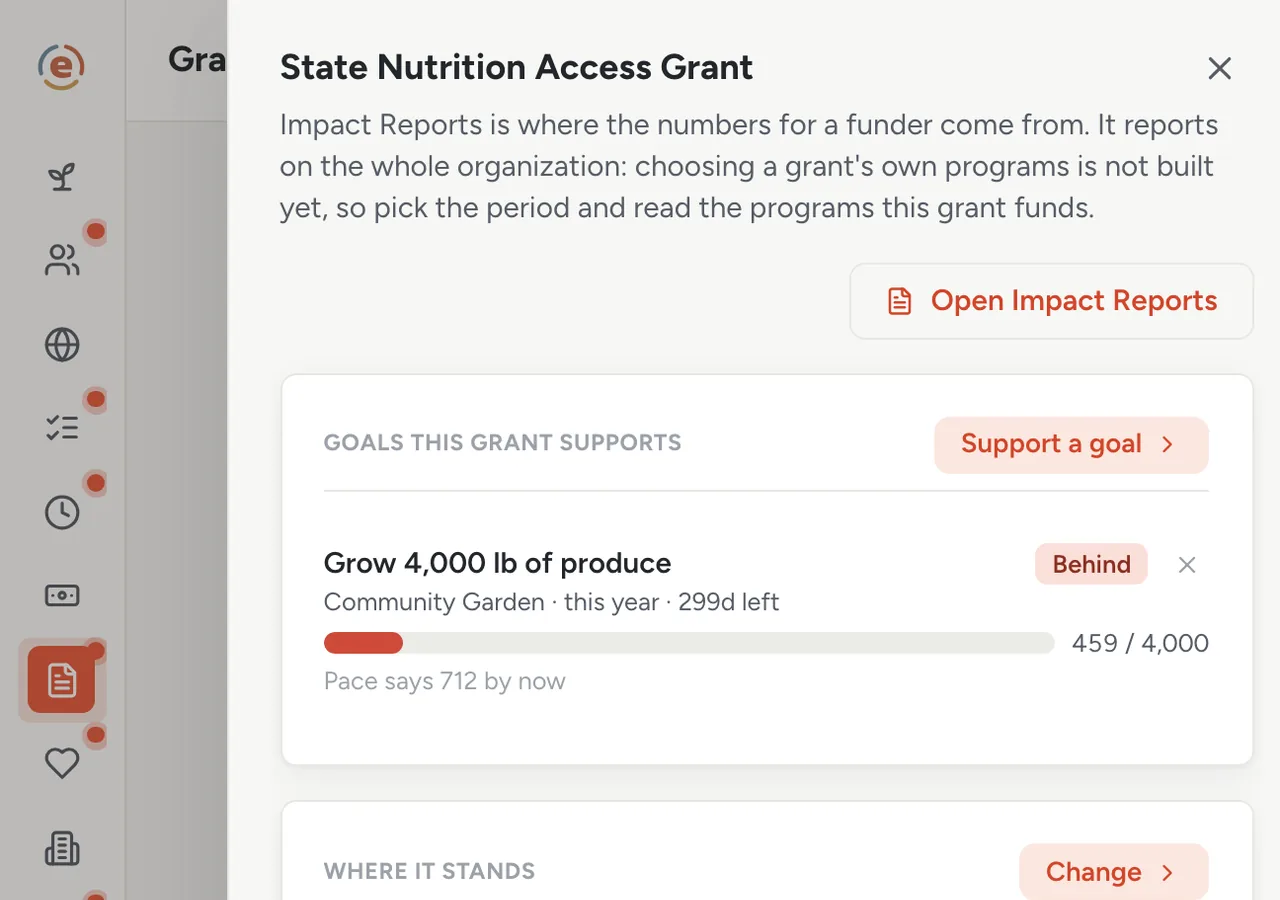
The state grant: one final report due, one goal it pays for. Demo data. Log the counts as they happen
Whoever runs the garden enters the week's harvest on Friday: one number, one date, a note if there is one. That is the whole habit, and it takes a minute. Nothing in Ember invents a count, so every figure in the report was typed by someone who was there.
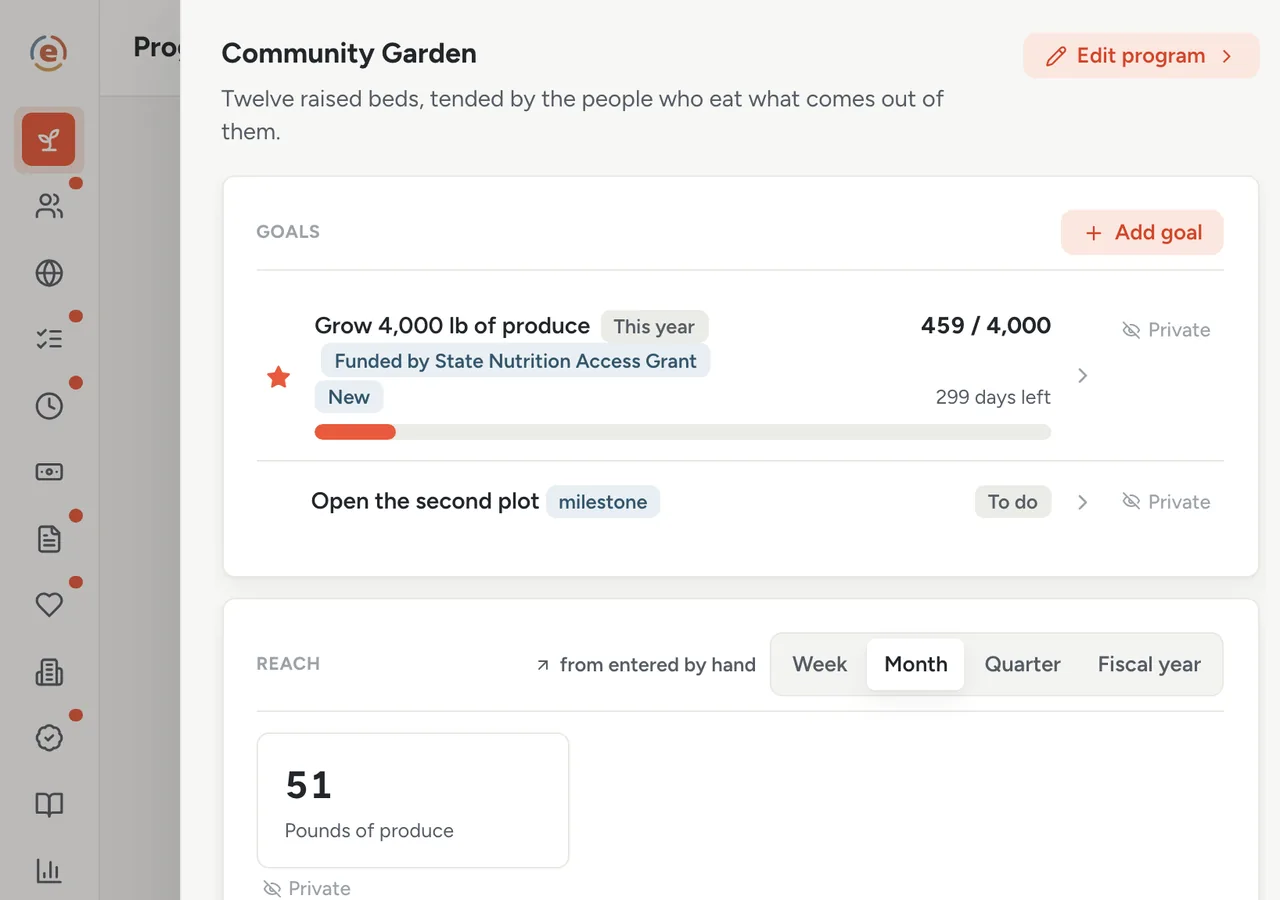
Weekly counts, one field each. The report is built from these. Demo data. The other numbers arrive on their own
Volunteer hours land on the program when you check people in at a shift. Spending lands on it from Ember Budget, because each cost is already recorded against a program when it is entered. Nobody re-types either one. Counts, hours and dollars end up in the same place.
Capture the story with consent
A volunteer says something worth keeping at the Wednesday shift. You write it down in Ember Stories: the line, the program, who is in it. It starts out visible only to your team. When that volunteer signs a release form, you record the release, and the quote becomes usable with funders and the board. Nothing goes further than the person agreed to. When you write the report, you copy the line in yourself, after checking who it is cleared for.
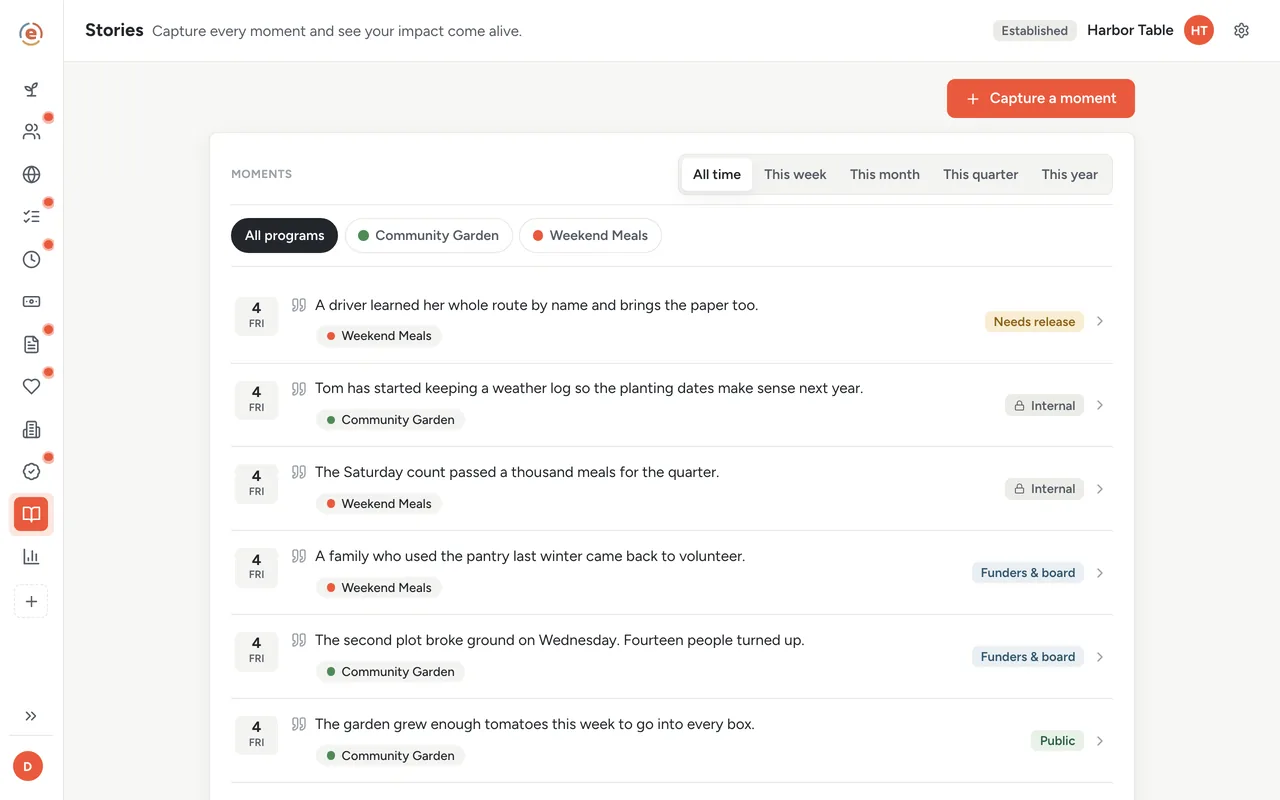
One line, one release, cleared for exactly the audience that signed. Demo data. Twelve days out: the year is already on one screen
Open the Community Garden in Ember Impact Reports and the year reads top to bottom in five parts. Where it stands: 459 pounds against the 4,000-pound goal, behind pace, with most of the year still to run. What we did: every count logged so far. What it took: $8,760 spent, $400 raised, 113 volunteer hours from 30 people, with the dollar value of that donated time underneath. What needs you: one overdue task. In our words: the good weeks your team wrote down as they happened.
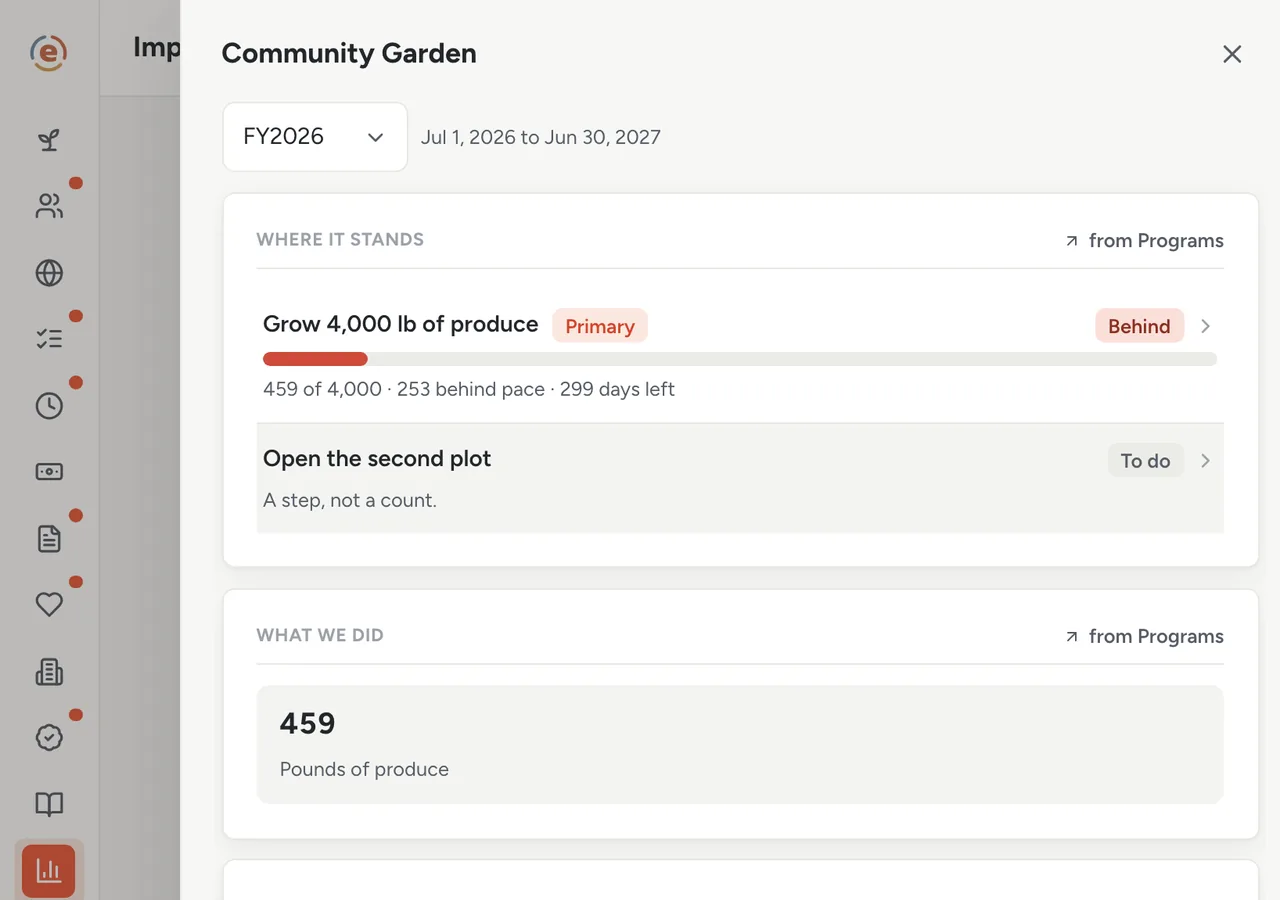
The whole year to date on one sheet, none of it re-typed. Demo data. The report is a snapshot plus two paragraphs
Close the program sheet, then tap Create a report on the Reports page and give it a name. Ember stores a copy of the figures as they stand today. It then opens your browser's print dialog for the Reports page, each program with its counts, and you save that as a PDF. The five bands are where you read the year; copy the figures you need from them into the report. If the funder wants the numbers in a spreadsheet, one more button gives you a CSV. What is left is the two paragraphs only a person can write.
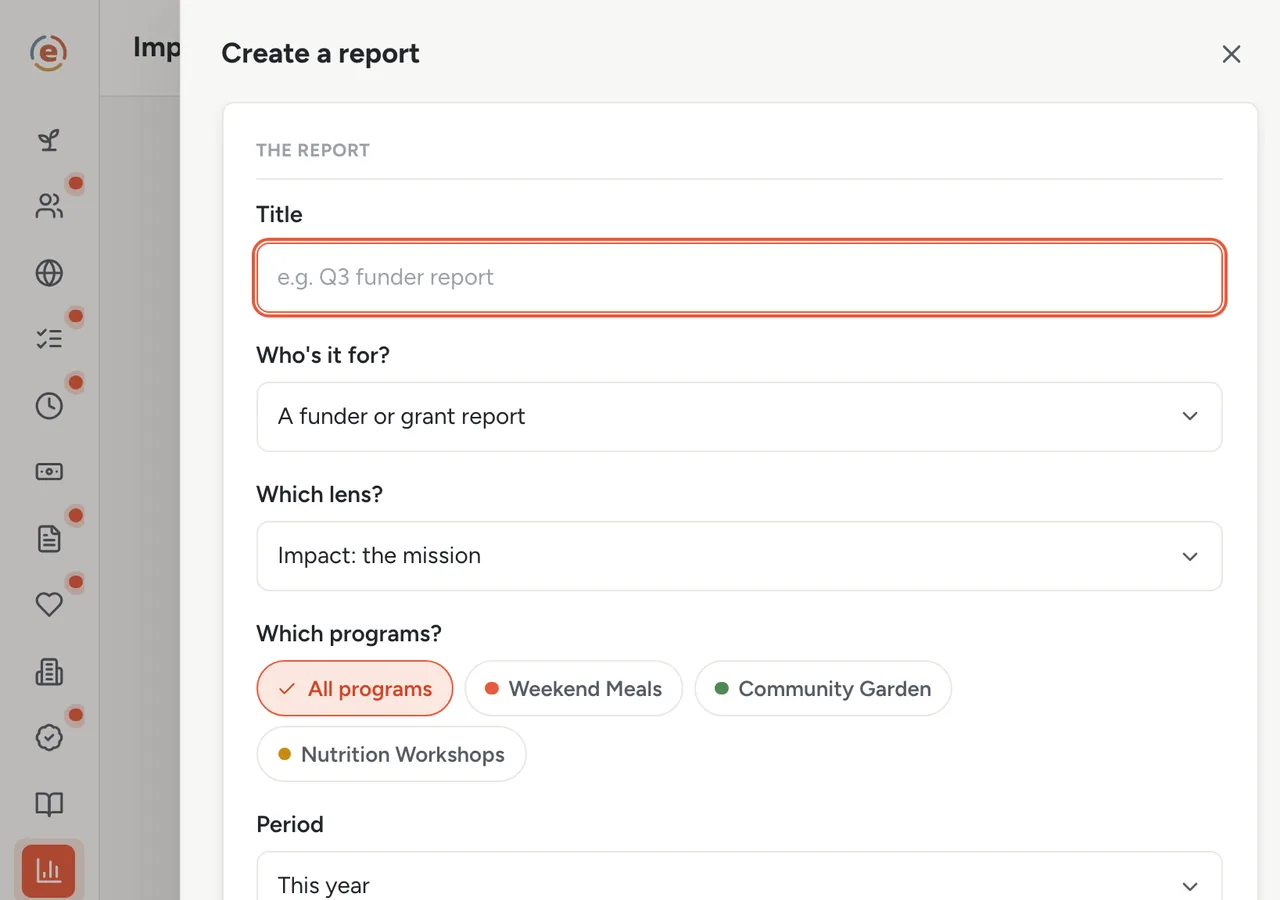
Name it, save the snapshot, print the Reports page to PDF. Demo data. Mark it submitted, and the next one is already listed
Back in Grants, mark the final report Submitted, then Accepted once the funder confirms. The county's mid-year report is already sitting on the Deadlines tab with its due date. You never opened a spreadsheet.
Who does what
If you are the executive director
You read five bands and write two paragraphs. The figures are the same ones the board saw, because they come from the same place.
If you are the program manager
You log a count a week and a reflection when something happens. That is the entire cost of a report that used to take a weekend.
If you are the coordinator
Your shift check-ins are the volunteer hours in the report. You never send a spreadsheet at quarter end.
- Programs with goals a funder is counting on, and a report due on each.
- Counts that can be logged weekly by the person doing the work.
- Volunteer hours and spend that should land on the program without re-typing.
- A wish to share real moments without sharing anything a person did not agree to.
What it costs at this size
An org with a $320K budget sits in the Established band: $99 a month billed yearly, every app, unlimited users. Under $50K a year it is $0. See every band.
Free templateGrant reporting requirements checklist
What funders usually ask for, so you know what to log before the report is due.
This is general information, not legal or accounting advice. Federal grant rules change and are applied differently by different agencies and auditors. Check with your auditor, your grant officer, or an attorney before relying on any of it.
The Ember tool for this stepEmber Programs
Ember Programs gives each program its goals, its counts and a weekly reflection, and shows whether each goal is on pace. Unlimited users on every tier.
The Ember tool for this stepEmber Impact Reports
Ember Impact Reports gathers each program's counts, volunteer hours and spending from the Ember apps you already use, so nothing is typed twice. Unlimited users on every tier.
The Ember tool for this stepEmber Grants
Ember Grants keeps every award, deadline and report in one place. You can see what you owe each funder, and when. Unlimited users on every tier.
The Ember tool for this stepEmber Stories
Ember Stories keeps the moments behind your numbers, each tagged to its program. Every moment starts visible only to your team, and goes further only when you clear it. Unlimited users on every tier.
Sources: The org, people and figures on this page are an invented example; Ember has no customer data to report yet. Product behavior is described as built on 3 September 2026 and re-checked at each release.